On this page
How Reddy Anna login actually works
Reddy Anna login confuses newcomers for one structural reason: there is no single login page to bookmark, because your ID lives on an exchange platform whose address changes from time to time, reached with credentials issued by your desk. Once that clicks, every login problem on this page becomes obvious. You are not logging into a website you found; you are logging into an account your desk maintains, at whatever front door the platform currently uses – and the desk’s chat is the permanent source of both the current link and the credentials.
Practically: your username and password arrived in the WhatsApp thread that opened your ID, alongside the platform link. That thread outlives every domain change, every mirror, every “new login page” panic. Players who understand this stop googling “reddy anna login” entirely – which is wise, because that search result mixes real doors with harvesting pages built to collect exactly the credentials you are about to type.
First login: the five-minute setup
- Open the platform link from your chat – not from search, not from a forward. Type-check the address once against what the desk sent.
- Enter the issued username and password exactly as sent; copy-paste trailing spaces are the most common first-login failure.
- Change the password immediately. The issued one has existed inside a chat; retire it. Account menu, thirty seconds, something used nowhere else.
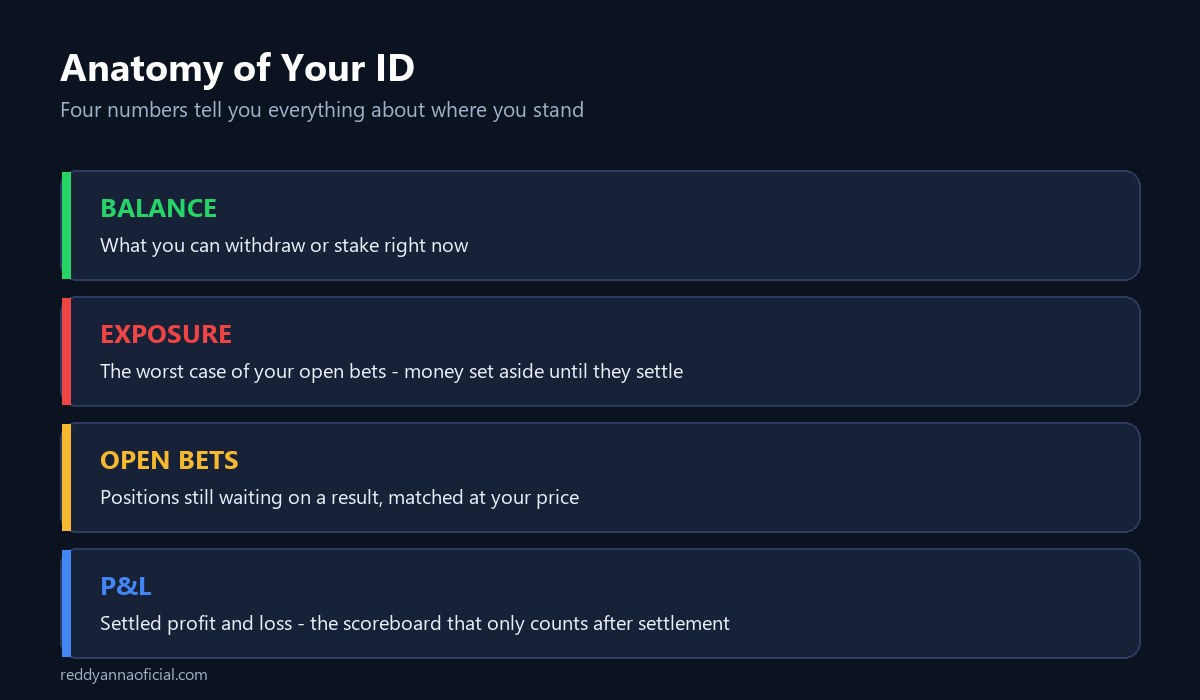
- Read the four numbers – balance, exposure, open bets, P&L. The ID anatomy guide decodes them; sixty seconds now prevents every “where did my balance go” panic later.
- Log out, log back in with the new password. Now the credentials are verified, memorised or stored properly, and yours alone.
Password lifecycle – issued, changed, forgotten, recovered
Every credential on this desk moves through four states, and knowing the map removes the drama from each. Issued: the starter key, sent in chat, meant to be replaced within minutes. Changed: your real password, set at first login, unique to this account – password reuse is how a breach elsewhere becomes a breach here. Forgotten: routine, human, handled on the thread that opened the ID: message it, pass the ownership check, receive a reset within minutes. Recovered: the deeper case – lost phone, dead number – where the desk verifies you through transaction history and the bank account withdrawals were paid to. Slower, but designed for exactly this; the ID guide’s number-change section covers moving the account to a new number before the old one dies, which turns recovery into a two-minute formality.
One rule threads through all four states: no one legitimate ever asks you to tell them a password or an OTP. Not for resets, not for verification, not for bonuses. The desk resets credentials without needing the old ones; only thieves need you to type secrets to a human. That single sentence defeats the entire account-takeover industry.
Locked out? The fix ladder
| Symptom | Usual cause | The fix, in order |
|---|---|---|
| Wrong password error | Autofill serving a dead password | Type it manually, character by character |
| Page will not load | Platform address changed | Ask the chat for the current link – never search for one |
| Logged out repeatedly | Two devices sharing one session | Log out everywhere, log in once, stay on one device |
| Account locked message | Failed attempts tripped the guard | Message the desk; unlocked after an ownership check, usually minutes |
| Login works, balance looks wrong | Exposure on open bets | Not a login problem – read the anatomy guide, settle or trade out |
Escalation past the table lives on the account issues page – but in years of desk work, the five rows above cover essentially every lockout that was not an attempted theft. And if a lockout arrived with a demand for payment to restore access, it was never a lockout: that is a clone monetising panic, and your real desk is one message away on the number published here.
Why the login page keeps moving
The recurring shock for new players: the link that worked last month is dead, and search throws up six lookalikes. Exchange platforms in India rotate domains constantly – blocking orders, hosting churn, promoter turf – and every rotation spawns harvesting clones of the new address within days. This is background weather, not crisis. The desk absorbs it: current link, on request, in the chat, every time. The only players actually endangered by URL churn are the ones who navigate by search engine – which on a login query is precisely where credential-harvesting pages wait. Treat “reddy anna login page” as a question for your chat, never for a search bar, and the entire category of fake-login theft simply cannot reach you.
Spotting a harvest page
Since search results on login queries are where credentials get stolen, learn the thirty-second inspection. A harvesting page copies the platform’s look but not its behaviour: it accepts any password (type nonsense first – a real platform rejects it, a harvester swallows it and errors afterwards), its address is days old with letters shuffled, and it often asks for extras a real login never wants – a phone number “for verification”, even payment details on the login screen itself. The deeper defence is structural, though: a player whose links only ever come from the desk chat never meets these pages at all. The inspection is for the day you slip.
Demo logins, and logging in on the app
Two adjacent questions worth settling. A demo login – a practice account for inspecting markets before depositing – exists on several platforms and costs nothing when your desk provides one; ask in the chat, and treat anyone selling demo access as running a fee scam in costume. And app login is the same credentials against the same account – the official file from your chat per the app page – with one caution: keep live sessions to one surface at a time, or the platform’s one-session guard will bounce both.
Login security in four habits
- The link from the chat, always. Covered above; worth repeating because it defeats the most common theft outright.
- One device, logged out elsewhere. Sessions fight, and shared or public browsers remember more than they admit.
- A unique password, changed on day one – and never spoken, typed to a person, or “confirmed” anywhere.
- OTPs are for machines, not conversations. The moment a human asks for one, the conversation is the attack.
Frequently asked questions
Reddy anna login kaise kare?
Apne WhatsApp chat se platform link kholo, wahi username-password daalo jo desk ne bheja tha, aur pehli login par password change karo. Link kabhi search se mat lo – hamesha chat se.
I forgot my Reddy Anna password. What now?
Message the thread that opened your ID; after a quick ownership check the password is reset within minutes. You will never be asked for the old one.
Why does the login link keep changing?
Platform domains rotate industry-wide. The chat always holds the current link – the moving door only endangers players who navigate by search.
Where do I get a Reddy Anna login ID and password?
From a desk, in your own WhatsApp chat, when your ID is created – there is no public signup form. Pages offering login IDs and passwords any other way are the free-password scam documented on the safety page.
Is there a new Reddy Anna login link?
Whenever the platform rotates domains, yes – and it is always one message away in your chat. New-link announcements anywhere else are how harvest pages advertise.
Is there a Reddy Anna login app?
The browser login pinned to your home screen behaves like an app, and an official file is available from the desk on request – details on the app page. Never install a login app from a store search or a forward.
Can someone log in from two phones?
Two live sessions fight and force logouts – the platform assumes one device. Log out everywhere, then use the one phone you actually play on.
The site asked me to confirm my password on WhatsApp. Should I?
Never – and note the trap in the question: real desks reset credentials without needing them. Whoever asked is not your desk, whatever the display name says. Verify against the number published on this site.